



TurboTax W2 Finder is an essential tool for anyone looking to quickly locate and access their W-2 form online. With this tool, you can easily retrieve your W-2 from TurboTax without waiting for a physical copy from your employer. This streamlined process saves time and helps ensure accurate tax filing.
Many employers now provide W-2 forms electronically, making it easier to find your form using TurboTax. By integrating with payroll services like ADP, Workday, and Gusto, TurboTax automatically pulls in your W-2 information, allowing you to access it directly through your account. This eliminates the need for manual tracking.
Whether you’re wondering how to download your W-2 from TurboTax or need help with missing W-2s, the TurboTax W2 Finder offers a simple solution. With user-friendly features and secure login options, TurboTax makes it easy to find and view your W-2 form, ensuring you’re ready for tax season.
What is TurboTax W2 Finder?
TurboTax W2 Finder is an online tool that helps you locate your W2 form through the TurboTax platform. It simplifies the process of retrieving your W2 by providing a central location to search for and download your tax forms. The TurboTax W2 Finder can search for forms based on the information you’ve entered into TurboTax, which can save time and avoid the hassle of contacting your employer for a physical copy.
How TurboTax Integrates with Payroll Services
TurboTax W2 Finder works seamlessly with popular payroll services like ADP, Workday, and Gusto. These integrations allow TurboTax to automatically pull in your W2 if your employer uses these services. This ensures that you don’t have to manually track down your W2 form or rely on paper copies. The integration saves time and minimizes errors by ensuring that the W2 information is transferred directly into TurboTax.
The Security Features of TurboTax W2 Finder
TurboTax takes your privacy seriously. The platform uses bank-grade encryption to ensure your sensitive tax data is protected. Additionally, TurboTax employs multi-factor authentication (MFA) to secure your login and prevent unauthorized access to your account. You can trust TurboTax’s W2 Finder to keep your personal information safe while you search for and download your W2 form.
Can TurboTax Find My W2 for Me?
Yes, TurboTax can help you find your W2 form. If your employer has submitted your W2 electronically, TurboTax W2 Finder will be able to access it. In fact, many employers now provide W2s online, and TurboTax integrates with these systems to make the process easier for you. By logging into your TurboTax account and using the W2 Finder, you can retrieve your W2 with just a few clicks.
How to Use TurboTax W2 Finder: Step-by-Step Guide
1. Log in to TurboTax
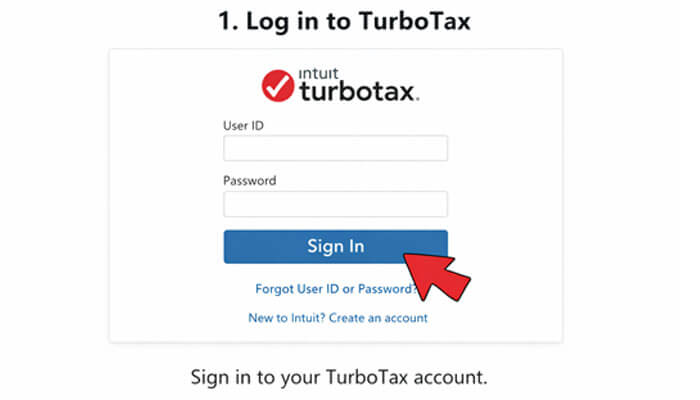
To get started, sign in to your TurboTax account. If you don’t have an account yet, you’ll need to create one first.
2. Navigate to the W2 Finder
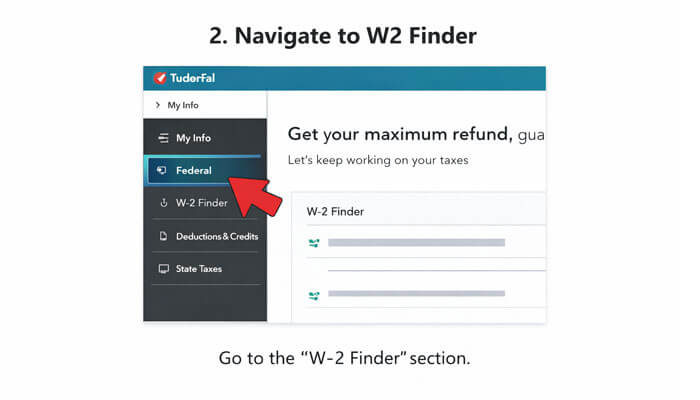
Once logged in, go to the “W2 Finder” section. This will be prominently displayed on your dashboard or in the menu. Look for the option that says “Find W2” or similar wording.
3. Enter Your Employer’s Details
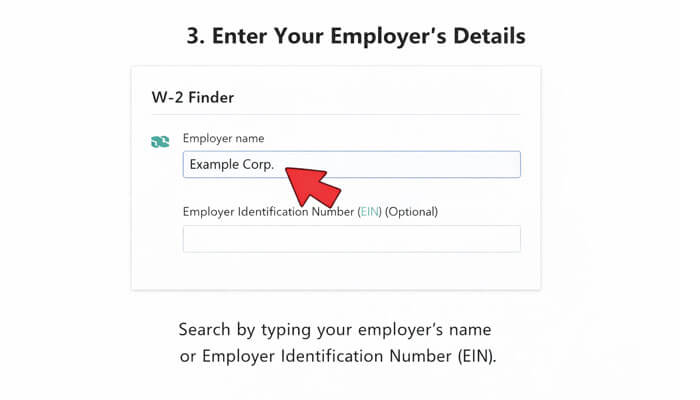
In the TurboTax W2 Finder, you’ll need to enter your employer’s name or Employer Identification Number (EIN) to begin the search. TurboTax will use this information to search for your W2 in its database.
4. Download Your W2
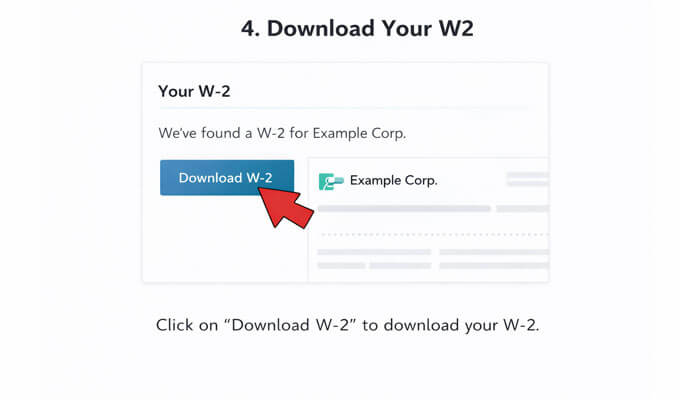
Once the W2 is located, you’ll be able to download a copy of your W2. TurboTax will display it in a readable format so that you can view and save it. You may also have the option to file your taxes directly from this form.
Can I See My W2 on TurboTax Before Filing?
Absolutely! TurboTax allows you to view your W2 form as soon as it’s available in the system. There is no need to wait until your taxes are filed to access it. Once your W2 is found, you can review the information for accuracy. If any discrepancies are found, you can address them before submitting your taxes.
How to Download Your W2 from TurboTax
Downloading your W2 from TurboTax is simple:
- Find the W2 Form: Use the TurboTax W2 Finder to locate your W2.
- Click the Download Button: Once your form is located, click on the “Download” button to save it to your computer.
- Save for Future Use: Store your W2 in a secure location. You may need to reference it in the future or use it for tax filing purposes.
What to Do if You Can’t Find Your W2 on TurboTax
In some cases, you might not be able to find your W2 on TurboTax. Here’s what to do:
- Double-check Employer Information: Ensure that you’ve entered the correct details for your employer.
- Contact Your Employer: If TurboTax can’t find your W2, contact your employer directly. Some employers delay submitting W2s to TurboTax.
- Check the IRS: If your employer hasn’t submitted the W2, you can request a copy from the IRS.
Common Errors & How to Resolve Them
- Mismatched Employer Information: If the employer details you entered don’t match the records TurboTax has, you may not be able to locate your W2. Ensure the name and EIN are correct.
- Missing W2 Submission: Some employers may not submit their W2s electronically. In this case, you can manually upload your W2 or wait until it’s available through TurboTax.
What to Do if You’re Locked Out of TurboTax
If you’re having trouble logging into TurboTax or can’t access the W2 Finder, here’s what to do:
- Reset Your Password: Use the “Forgot Password” option to reset your credentials.
- Contact TurboTax Support: If you continue having trouble, contact TurboTax’s customer service for assistance.
Can TurboTax W2 Finder Login Help if I Lost My W2?
Yes, if you’ve lost your W2, using the TurboTax W2 Finder login may still help. TurboTax has partnerships with various payroll services and may be able to locate your W2 if it’s been electronically submitted. It’s worth trying this tool before reaching out to your employer directly.
Why Use TurboTax W2 Finder?
Here are the top reasons to use the TurboTax W2 Finder:
- Convenience: Find and download your W2 without waiting for your employer to send it.
- Speed: Retrieve your W2 in just a few clicks.
- Accuracy: TurboTax ensures that the W2 you access is the correct version, minimizing errors.
- Direct Tax Filing: Once you have your W2, you can start your tax return immediately.
Where to Find Your W2 on TurboTax
Finding your W2 on TurboTax is as easy as logging into your account and navigating to the W2 Finder. Once there, you can access, view, and download your W2. The process is intuitive and straightforward, making it accessible for users of all experience levels.
Final Thoughts
TurboTax W2 Finder is a convenient and secure way to access your W2 form, ensuring you can file your taxes quickly and accurately. Whether you’ve misplaced your W2 or want to avoid waiting for your employer to send it, TurboTax makes the process seamless. If you’re having trouble locating your form, following the steps outlined above should resolve most issues — but remember, the IRS is always there to help if needed.
TurboTax W2 Finder FAQs
What is TurboTax W2 Finder and how does it work?
The TurboTax W2 Finder is a tool that helps users quickly locate and access their W-2 forms online by searching employer-submitted records within the platform.
Can TurboTax W2 Finder find my W2 automatically?
Yes, TurboTax W2 Finder can automatically find your W2 if your employer has submitted it electronically through supported payroll services.
How do I use TurboTax W2 Finder to locate my W2?
To use TurboTax W2 Finder, log in to your account, go to the W2 Finder section, enter your employer details, and search for your W2 form.
How to download W2 from TurboTax W2 Finder?
After locating your form using TurboTax W2 Finder, simply click the download option to save your W2 securely to your device.
Why is my W2 not showing in TurboTax W2 Finder?
Your W2 may not appear in TurboTax W2 Finder if your employer hasn’t submitted it electronically or if incorrect employer details were entered.
Can I view my W2 before filing using TurboTax W2 Finder?
Yes, TurboTax W2 Finder allows you to view your W2 as soon as it becomes available, even before you file your taxes.
Is TurboTax W2 Finder safe to use?
TurboTax W2 Finder is secure and uses advanced encryption and multi-factor authentication to protect your personal tax information.
Can TurboTax W2 Finder help if I lost my W2?
Yes, TurboTax W2 Finder can help retrieve your W2 if it has been electronically submitted, making it useful if you’ve lost your original copy.
